Capture from a phone
Open a secure QR session, confirm a short-lived upload code, and capture up to 10 document photos in one batch.
AI receipt, invoice, and expense scanner.
SCAN-PAP + QUICKBOOKS ONLINE
Capture receipts from your phone, files, or Gmail. Review the extracted vendor, date, category, and total, then send the approved expense and source document to QuickBooks Online.
QuickBooks Online integration available now
No card required. Review every number before it is saved.
FROM PAPERWORK TO DECISIONS
Scan-Pap reads the source, structures the fields, pauses for your review, and sends approved expense data and source proof into QuickBooks.
AI assists the extraction and analysis. You approve the record before it is saved or sent to QuickBooks.
MOBILE BATCH CAPTURE
Start the scan from your desktop, open the secure QR link on your phone, and photograph up to 10 documents before sending the batch. Scan-Pap reads every image into its own Pending Review record.
ONE INBOX FOR BUSINESS PAPERWORK
Bring the document in through the channel that is already convenient, then handle it through one consistent review workflow.
Open a secure QR session, confirm a short-lived upload code, and capture up to 10 document photos in one batch.
Bring in PDFs and images in batches, or use the dedicated bank statement workflow to extract rows for verification.
Select invoice, receipt, or bill attachments from the email already open in Chrome and send only those files to Pending Review.
REVIEW BEFORE RECORD
Scan-Pap extracts the fields that take time to retype, then gives you a clear checkpoint for the fields that matter. Correct the result, confirm the customer, and save only when the record is ready.
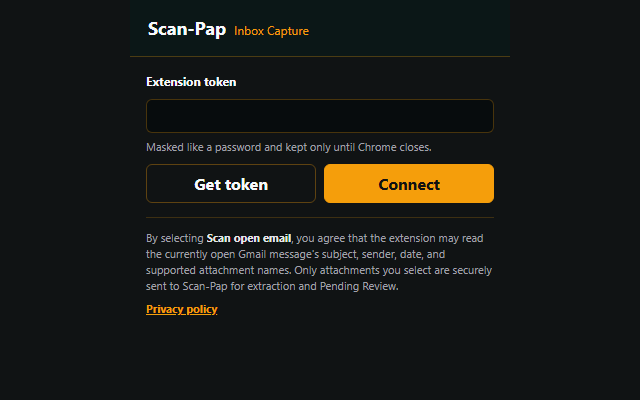
CHROME EXTENSION AVAILABLE NOW
Connect Inbox Capture with a private Scan-Pap token, choose the correct customer, and select the supported attachments you want to import. Each selected file goes to Pending Review with its source context.
AFTER THE DOCUMENT IS REVIEWED
Reviewed documents become useful records for day-to-day bookkeeping, reconciliation, and tax preparation instead of disappearing into a downloads folder.
Filter sales and expenses by customer, date, category, tag, or source while keeping the supporting file attached.
Review extracted statement rows and connect supporting receipts or mark documents that are not needed.
Surface records that may still need supporting documents and see customer activity by period and category.
Send selected expenses and their source documents to mapped QuickBooks accounts, or create filtered PDF, Excel, and accounting CSV exports.
SOLVE THE PAPERWORK BOTTLENECK
Explore focused workflows for extraction, spreadsheet export, bookkeeping review, and CPA-ready supporting records.
Extract vendor, date, tax, totals, and line items from receipt photos or PDFs.
AI receipt scanner Scan receipts to ExcelTurn invoice PDFs, images, and Gmail attachments into reviewed transaction records.
AI invoice scannerConvert statement transactions into organized records and connect supporting proof.
Bank statement to ExcelGive bookkeepers and CPAs a clearer path from client paperwork to review-ready records.
For bookkeepers For CPAsBUILT FOR FINANCIAL DOCUMENTS
Private accessSecure login, HTTPS, private file storage, and account-level records.
Human approvalExtracted values wait for review before becoming saved transactions.
Least-data focusPrivate identifiers detected in extracted text are masked where supported.
SEE THE WORKFLOW
Request a focused walkthrough for your receipt, invoice, statement, or client-document process. We will show the capture, review, and reporting path that fits your work.